


Flag Football Playmaker X
4.464.00 Reviews
App Specs
- Version
- 1.10.0
- Updated On
- License
- Free
- Downloads
- 50,000+
- Developer
- True Partners, LLC
- Categories
- Sports
- Platform
- Android
Screenshots
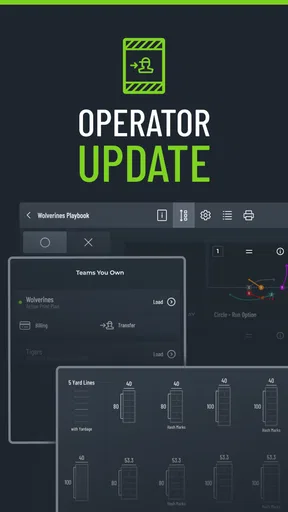
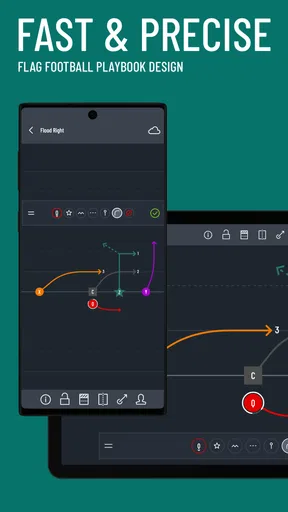
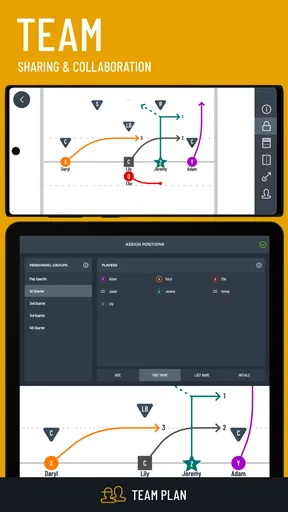
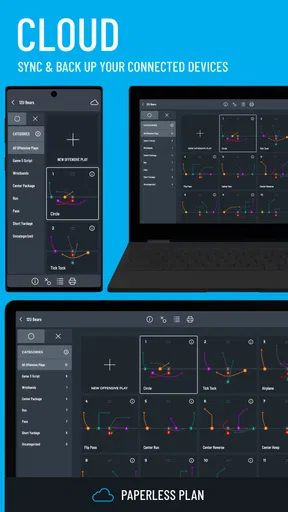
 Analysis by AppCompare
I think Flag Football Playmaker X is best understood as a practical organizer for the ideas a flag football team already has. It gives coaches and players a way to put plays into a visual format, keep them together, and prepare materials for the field. That focus makes it more useful than a notes app once a team has several formations or wants everyone to learn the same routes. It is less compelling if you only need a place to jot down one or two simple ideas.
A focused tool for building a playbook
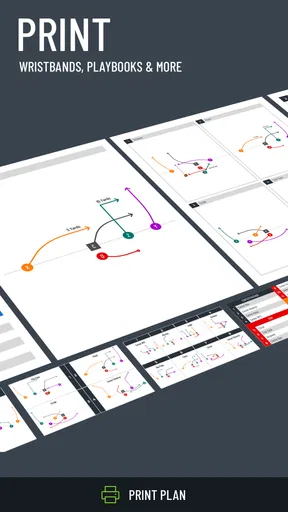
This is a sports app from True Partners, LLC, and its purpose is specific: planning flag football plays and preparing printed playbooks or wristbands. I like that this is not trying to be a general coaching platform. The value is in turning a coach’s diagram into something a team can review and use, rather than managing every part of a season in one place.
The app is free to download, with in-app purchases ranging from $7.99 to $12.99 per item. That is worth keeping in mind if you are comparing it with paper, a whiteboard, or a drawing app you already own. I would first decide whether your team will actually use a digital playbook and printed materials before paying for an add-on. A coach who only needs to sketch plays occasionally may be satisfied with a basic alternative.
Who gets the most out of it
I can see this fitting a volunteer coach who needs to prepare a small set of clear, repeatable plays, or a player who learns routes more easily from a diagram than from a spoken explanation. It can also help a team keep its terminology consistent: a route and its intended assignment are easier to revisit when the group is looking at the same drawing rather than relying on different memories of a sideline talk.
For a new coach, the best approach is to begin with only the plays the team actually uses. Give each one a clear name, keep the drawing uncluttered, and add only notes that answer a practical question, such as where a player starts or what cue changes the route. That small discipline matters more than filling the playbook with options. A crowded collection is harder to use under time pressure, whether it lives on a phone or on paper.
How it fits into ordinary practice
Picture a coach reviewing a practice plan the evening before a game. Instead of redrawing the same routes from memory, they can organize the intended plays, check that the diagrams communicate the assignments, and prepare a version players can refer to. At practice, the group can look at a shared visual reference before running the play. That is a modest workflow, but it can save repeated explanations and give quieter players a chance to study the routes at their own pace.
The wristband and printing angle is especially relevant when a team wants information available without asking players to scroll through a phone during a game. I would treat printed material as a companion to the digital playbook, not as a substitute for teaching. A diagram is a reminder, not a guarantee that every player understands the timing, spacing, or adjustment. Walk through the play together and use the printed version to reinforce what the team has practiced.
Worth Reading Before You Choose

Flipboard Shows What News Apps Must Do Beyond the Feed

Switching to Android Auto Means Rethinking Your Driving Routine

Google Calendar Makes a Crowded Week Easier to Manage

Ludo King Makes the Most of the Minutes Between Plans

Baby Panda World Brings Quick Play to Modern Phones, but Its Game Library Feels Busy

ESPN’s Live Game View Makes Following Close Games Easier
Where it sits beside other options
Compared with a whiteboard, a phone-based playbook is easier to keep organized and revisit without erasing yesterday’s work. Compared with a general drawing app, a tool built around flag football playbooks and wristband printing is more directly aligned with how a coach might prepare for a game. Paper still has an advantage when the priority is instant visibility for the whole group, while a shared digital file can be more convenient for reviewing material away from the field.
There is a trade-off: the app can help with diagrams and preparation, but it cannot replace a coach’s judgement about whether a play suits the team’s experience or the opponent. If your main need is team messaging, attendance, scheduling, or detailed performance tracking, I would look for a broader coaching solution instead. This app makes more sense when play design and printed reference materials are the specific jobs you want to handle.
Getting Started with Flag Football Playmaker X
Diving into Flag Football Playmaker X is like opening a treasure chest filled with strategic gems. The setup is a breeze; downloading and installing the app on your Android or iOS device takes just a few minutes. Once you’re in, you’ll be greeted by a clean, intuitive interface that’s designed with both beginners and seasoned coaches in mind.
The first thing I noticed was how easy it is to navigate through the app. You’re not bombarded with unnecessary options, but rather presented with straightforward menus that let you create, edit, and share plays. It’s kind of like having a digital playbook that fits right in your pocket.
Creating Plays Like a Pro
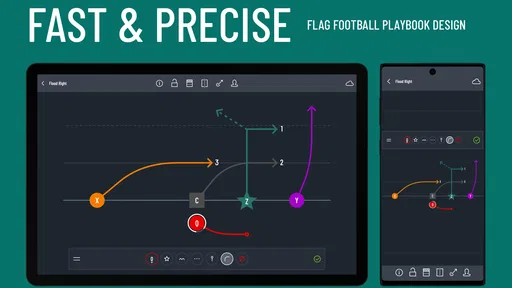
The play creation feature is where this app really shines. You can craft detailed plays using simple drag-and-drop tools. Setting up players, drawing routes, and adding notes is a cinch. If you’ve ever doodled plays on a napkin, you’ll appreciate how much more precise you can be with this app.
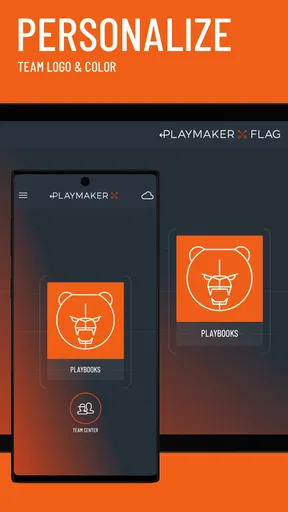
And let me tell you, the customization options are impressive. You can adjust player positions, change colors, and even add animated routes to make your plays come alive. For someone who thrives on visual aids, it’s a dream come true. Plus, the app allows you to save these plays, organize them into categories, and retrieve them effortlessly during a game.
Making diagrams easier to teach
The most useful habit I found is to design a play for someone seeing it for the first time, not for myself as its creator. It is tempting to add every variation and coaching note to one screen, especially when the app lets you adjust positions, colors, and routes. I would instead make a clean base version, then keep any meaningful variation as a separate play. That way, a player can quickly understand the intended movement instead of decoding a crowded diagram.
Color can help distinguish routes or roles, but consistency matters more than decoration. If the same color means one thing in one play and something else in the next, the visual aid loses its value. I would settle on a simple team convention and explain it once at practice. Similarly, notes work best when they clarify a decision or assignment, rather than restating what the drawing already shows.
Sharing and preparing for the field
Another feature that I found incredibly useful is the sharing capability. You can easily share your playbook with your team via email or social media. No more scrambling to explain a play during a timeout—everyone can have the plays right on their devices. It’s like syncing up your team’s brainwaves.
For a real team workflow, I would share a stable set of plays before practice rather than sending frequent changes right before a game. Players need a chance to review what they are expected to run, and a last-minute replacement can leave someone working from an older copy. If a change is necessary, make its purpose clear when you communicate it. The app can help distribute the diagram, but the coach still needs to make sure everyone is looking at the same version.
Game Day Ready
When game day arrives, the app’s quick access feature ensures that you have all your plays at your fingertips. The user-friendly layout means you can quickly find the play you need without fumbling through endless screens. It’s perfect for staying focused and keeping the team organized.
Plus, the ability to adjust plays on the fly is a real lifesaver. If you spot a weakness in the opposing team’s defense, you can tweak your strategy right there and then. It’s like having a tactical advantage that can turn the tide of the game in your favor.
I would still avoid making a phone the only game-day reference. A coach may be interrupted, the screen can be awkward to show to a whole group, and players do not all process a new diagram instantly. A printed wristband or a quick huddle explanation can be easier in the moment, while the app remains useful for finding the original play and preparing a deliberate adjustment. In my view, the strongest setup is a rehearsed playbook with a practical sideline reference, not improvisation through a screen.
What a new user should expect
The app is rated for Everyone, and its average rating is 4.3 from around 236 ratings, with about 58 written reviews. It has passed 50,000 installs, which suggests that it has found an audience beyond a handful of teams, though popularity alone cannot tell you whether its workflow matches yours. Its current version is 1.8.0, and it first appeared on August 27, 2019. Those milestones give a useful sense of an established, focused app rather than a brand-new experiment; they do not, by themselves, establish what changed between releases.
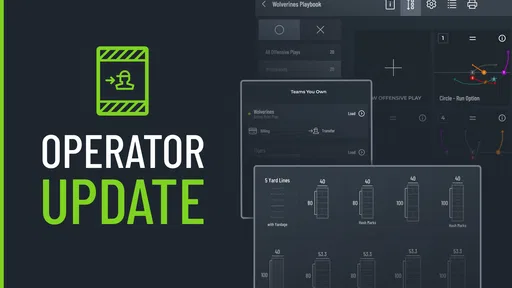
For an existing user, the practical question is whether the current version still supports the way the team prepares plays and prints materials. I would review a small set of actual plays after an update, check that the diagrams remain clear, and make sure the team’s sharing routine still works before relying on it for a game. That is a sensible habit for any playbook tool, especially when the material will be used by several people. I would not assume a particular feature was added or removed just from the version number.
Room for Improvement
No app is perfect, and there are a few areas where Flag Football Playmaker X could improve. For instance, integrating more tutorial content for absolute beginners could be beneficial. While the app is intuitive, a few guided tutorials would make the learning curve even smoother.
Also, while the app runs smoothly on most devices, a bit more optimization for older hardware could make it accessible to a wider audience. But hey, these are small potatoes compared to the overall functionality and usefulness of the app.
Knowing when another approach is better
Not every coach needs a dedicated playbook app. If you are coaching a very small group and use only a couple of uncomplicated plays, a whiteboard may be quicker and easier to discuss face to face. If several people need to revise the same material together, a shared document or a broader team-coordination tool may fit better, depending on the workflow you already use. I would choose this app when the visual play collection and print preparation are central, not just because a team uses phones.
It is also worth separating the cost of trying the app from the cost of building a whole routine around it. The download is free, but individual in-app purchases cost between $7.99 and $12.99 each. Before buying, I would identify the specific output or capability the team needs and confirm that it suits your use. A coach who only wants to test play diagrams can start with the free app; a team that expects printed materials should weigh the purchase against how often those materials will actually be used.
What I would watch next
For a tool with a specific job, the most meaningful sign of continued development would be improvements that make the path from drawing to team-ready reference clearer: approachable guidance for first-time coaches, dependable handling of existing playbooks, and a smooth way to prepare printed materials. Those are priorities I would value, not promises about what a future release will contain. I would also look for whether the app remains comfortable to use on the devices a team already has, since a coach should not have to rebuild a workflow every time equipment changes.
My advice is to try it with one practice’s worth of plays before making it the team’s only source of truth. Build a few clear diagrams, share them, and see whether players can use them without extra explanation. If that test saves time and helps everyone arrive with the same understanding, the app is earning its place. If the team still relies on repeated verbal corrections, the issue may be the play design or teaching routine rather than the software.
Final Thoughts
In the end, Flag Football Playmaker X is a must-have tool for anyone involved in flag football, whether you’re a player, coach, or just a fan of the game. Its ease of use, robust features, and ability to enhance team coordination make it an invaluable resource. So if you’re looking to up your flag football game, give this app a try. Trust me, your playbook will thank you!
Pros
- User-friendly interface for quick play creation.
- Customizable playbooks enhance team strategies.
- Real-time collaboration for coaching staff.
- Extensive library of pre-made plays available.
- Cloud sync ensures data is always backed up.
Cons
- Limited free version options.
- No offline access for free users.
- Requires in-app purchases for full features.
- Occasional lag in play simulations.
- Steep learning curve for beginners.
FAQs for Flag Football Playmaker X
What is Flag Football Playmaker X and who is it for?
Flag Football Playmaker X is a comprehensive app designed for coaches and players of flag football. It helps users create and manage playbooks, strategies, and game plans. Whether you're coaching a youth team or an adult league, this app provides tools to effectively organize and streamline your coaching process.
How does the playbook feature work in Flag Football Playmaker X?
The playbook feature allows users to design custom plays using a drag-and-drop interface. You can create offensive and defensive formations, assign player roles, and annotate plays with notes. This feature is ideal for visualizing and communicating strategies to your team, making it easier to practice and execute during games.
Can I share my playbooks with other coaches or players?
Yes, Flag Football Playmaker X allows you to share your playbooks with others. You can export plays and send them via email or share them directly through the app. This feature ensures that all team members have access to the latest strategies and can collaborate effectively.
Is Flag Football Playmaker X available on both Android and iOS?
Yes, Flag Football Playmaker X is available for download on both Android and iOS devices. This cross-platform availability means you can use the app on various devices, ensuring flexibility and convenience for both coaches and players, regardless of their preferred operating system.
Are there any in-app purchases or subscription fees involved?
Flag Football Playmaker X offers both free and premium versions. While the free version provides basic features, the premium version unlocks advanced tools and functionalities for a subscription fee. This may include additional playbook storage, enhanced sharing options, and exclusive coaching tips, offering more value for dedicated users.


